Driver Qualifications 49 CFR Part 391
Driver qualification file software that shows every gap before an auditor does
See every driver’s file on one matrix, know exactly what’s missing or expiring, and hand an auditor a complete DQ file report in one click.
What is a driver qualification file?
A driver qualification (DQ) file is the record a motor carrier must keep for each driver who operates a commercial motor vehicle, under 49 CFR §391.51. It holds the driver’s employment application, motor vehicle records, road test or equivalent, medical examiner’s certificate and annual driving record review. The carrier keeps it for the length of employment plus three years.
DQ file gaps are a frequent finding in FMCSA compliance reviews, which is why Compliant Fleet treats each item as a dated requirement with its own status.
Driver Qualifications features
DQ file matrix
Every requirement, every driver, one screen
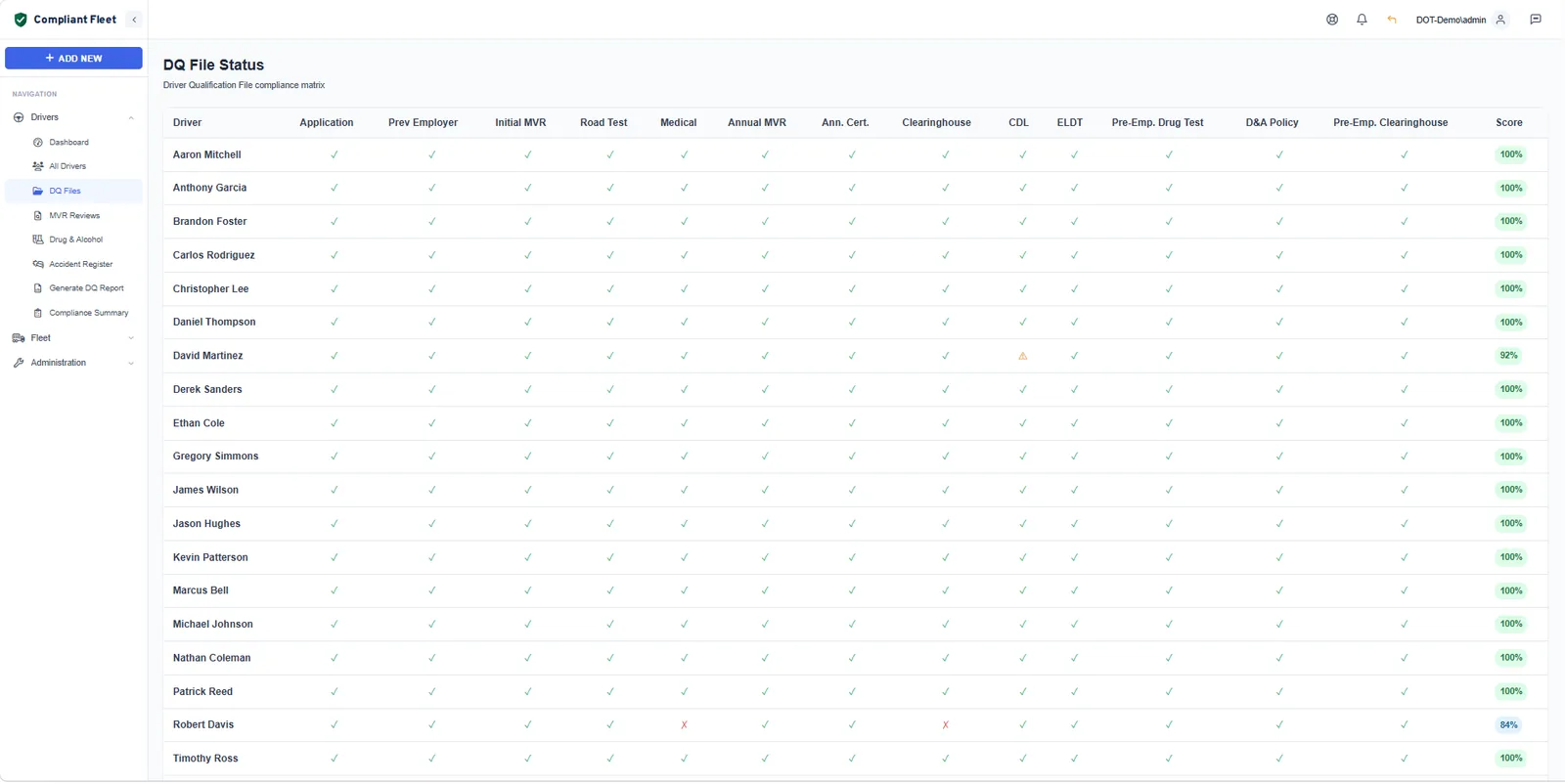
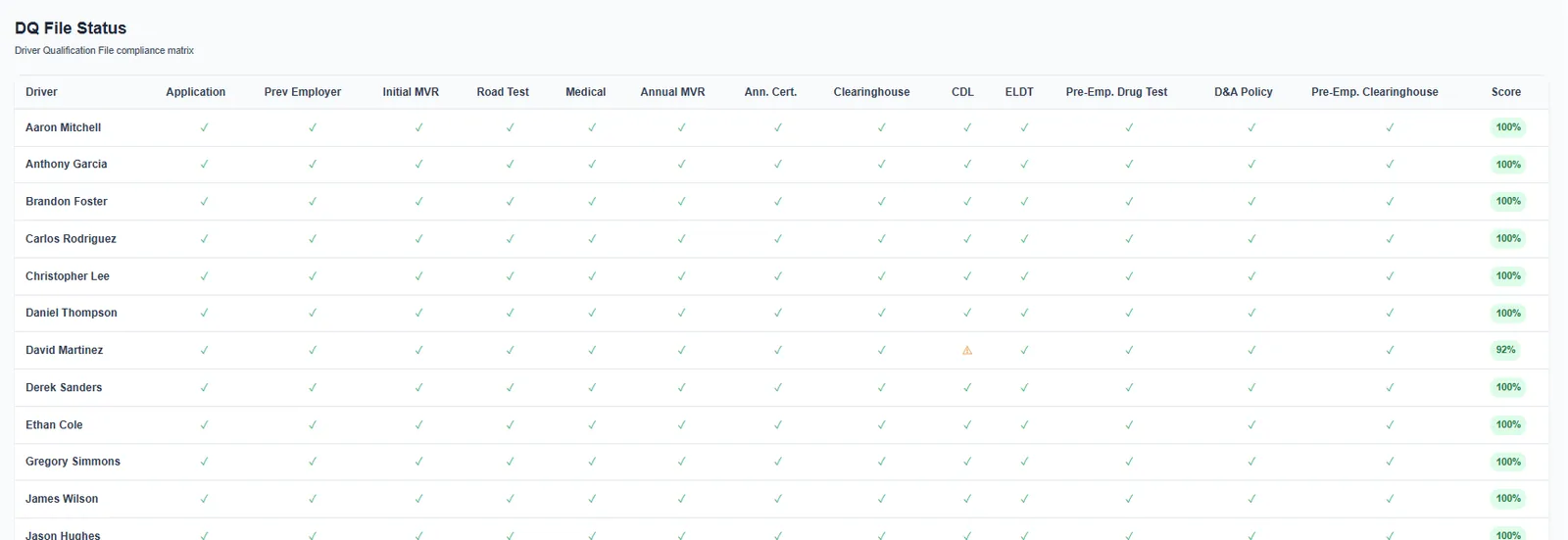
The DQ file matrix lines up your whole roster against 13 FMCSA requirement types: pre-employment items like the application, previous employer verification, initial MVR and road test, and ongoing items like the medical certificate, annual MVR and Clearinghouse queries.
- Green, amber and red status for every cell, so gaps stand out
- A compliance score for each driver and a fleet-wide compliance rate
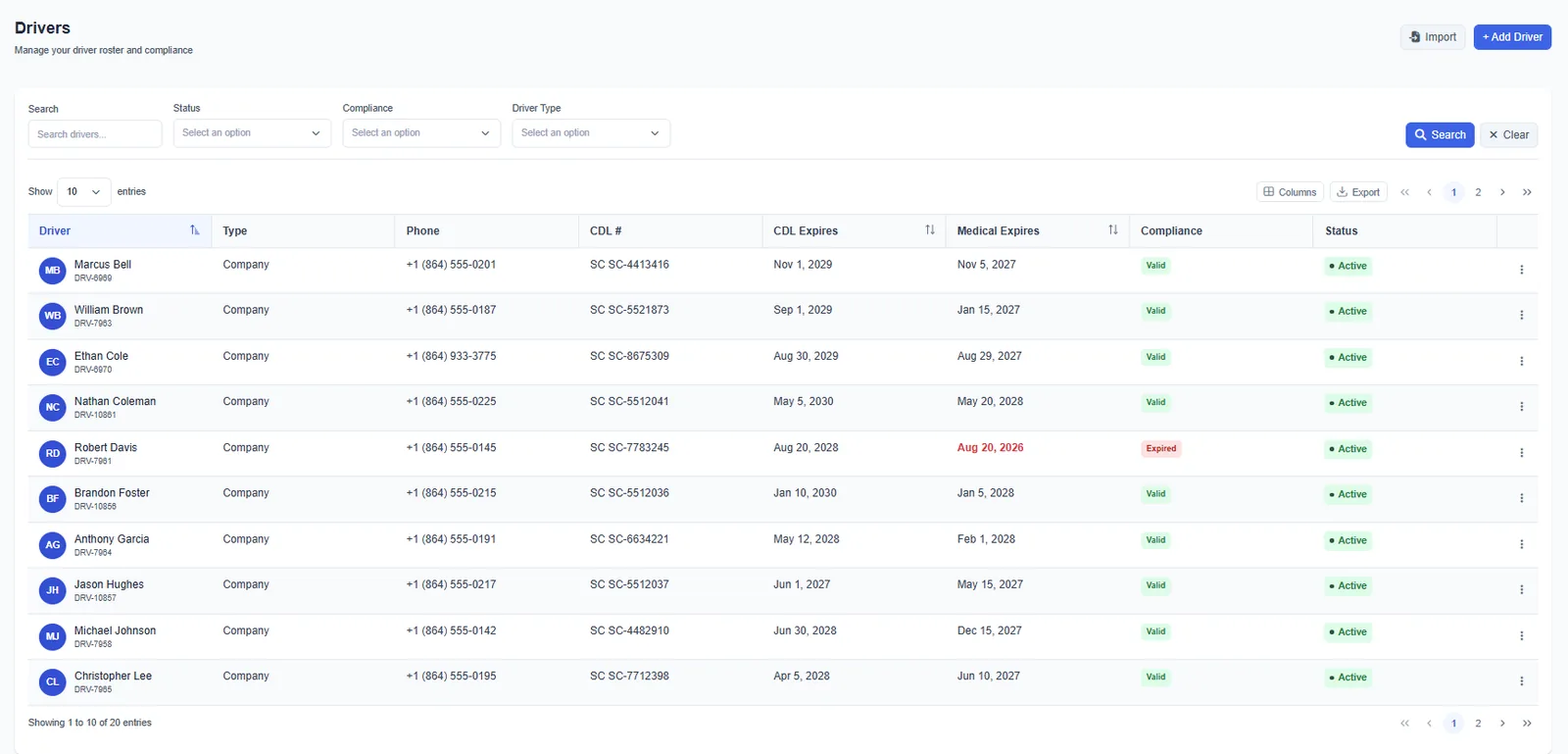
- Filter the driver roster by compliance status
Audit-ready reports
A complete DQ file report in one click
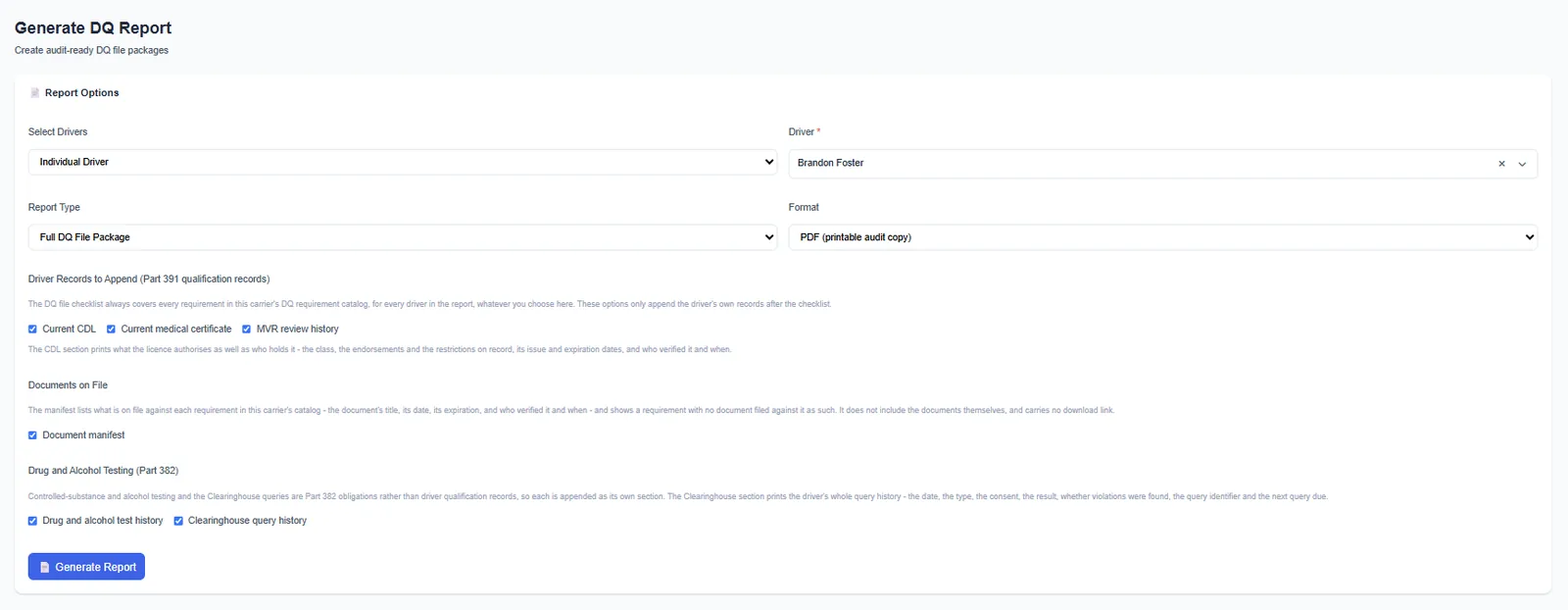
Pick the driver, the report type and the format. Compliant Fleet builds a full DQ file package, a summary or a status report, with your carrier name, USDOT number, each requirement’s CFR reference, completion and expiration dates, and who verified it.
- Printable PDF audit copy or CSV
- Add the current CDL, medical certificate and MVR review history
- Add a document manifest, drug and alcohol test history and Clearinghouse query history
Documents and verification
Each document dated, typed and verified
Upload the document behind each requirement and record its type, expiration date, who verified it and when. Each item shows its retention rule, so you know what has to stay in the file and for how long.
- Document type, expiration date, verified-by and verified-on for every file
- The retention rule shown on each item
- Add your own driver requirement types alongside the FMCSA list
Reference
DQ file requirements at a glance
The core items FMCSA expects for each driver, and how Compliant Fleet tracks them.
| Requirement | Regulation | When | In Compliant Fleet |
|---|---|---|---|
| Employment application | §391.21 | Before the driver operates a CMV | Checklist item with the signed application attached |
| Pre-employment MVR from each state licensed in the past 3 years | §391.23(a)(1) | Within 30 days of hire | Checklist item with date, document and verifier |
| Previous employer safety performance history, past 3 years | §391.23(a)(2) §391.53 | Within 30 days of hire | Checklist item; the inquiries themselves belong in the separate investigation history file |
| Road test certificate or accepted equivalent | §391.31 §391.33 | Before the driver operates a CMV | Checklist item with document |
| Medical examiner’s certificate | §391.43 §391.45 | At least every 24 months | Certificate history with a current record, expiration alerts and driver notices |
| Annual MVR and review of driving record | §391.25 | At least every 12 months | MVR review record with reviewer, violations, acceptability and next due date |
| Pre-employment drug test and Clearinghouse full query (CDL drivers) | §382.301 §382.701(a) | Before the first safety-sensitive function | Test and query records, included in the DQ report on request |
| Keep the DQ file | §391.51(c) | Employment plus 3 years | Retention rule shown on each item |
A summary for reference, not legal advice. Check the current text at eCFR, 49 CFR Part 391. Last reviewed September 24, 2026.
Questions
Driver qualification file questions
What documents go in a driver qualification file?
Under 49 CFR §391.51(b), a DQ file must include:
- The driver’s application for employment (§391.21)
- The pre-employment motor vehicle record from each state (§391.23(a)(1))
- The road test certificate, or a license or certificate accepted in its place (§391.31, §391.33)
- Each annual MVR and the note from the annual review of the driving record (§391.25)
- The medical examiner’s certificate, or for CDL holders the CDLIS motor vehicle record showing medical certification status
- Any Skill Performance Evaluation certificate or medical exemption
- For non-CDL drivers, a note verifying the medical examiner was on the National Registry (§391.23(m))
How long do you have to keep a driver qualification file?
A carrier keeps each DQ file for as long as the driver is employed and for three years after the driver leaves (§391.51(c)). Some items, including annual MVRs, annual review notes and medical certificates, may be removed three years after the date they were created (§391.51(d)). Compliant Fleet shows the retention rule on each item.
Do owner-operators and non-CDL drivers need a DQ file?
Part 391 applies to drivers of commercial motor vehicles as FMCSA defines them, which in interstate commerce includes many trucks of 10,001 pounds or more that do not require a CDL. An owner-operator with its own authority keeps a DQ file on itself. Drug and alcohol testing under Part 382 applies only to CDL drivers. Check the definitions in §390.5 for your operation.
Can Compliant Fleet produce a DQ file for an audit?
Yes. The DQ report builds a full DQ file package, a summary or a status report as a printable PDF or a CSV. It includes your carrier name and USDOT number, the driver’s details, and each requirement with its CFR reference, dates and who verified it. You can add the CDL, medical certificate, MVR review history, document manifest, drug and alcohol tests and Clearinghouse queries.
Does Compliant Fleet order MVRs or PSP reports?
No. Compliant Fleet records the MVR review, including the reviewer, violations, whether the record is acceptable and when the next review is due, and stores the MVR you obtained. Order MVRs from your state or your current provider.
Can I track requirements that aren’t on the FMCSA list?
Yes. Along with the 13 FMCSA requirement types, you can add your own driver requirement types, such as a company safety policy sign-off or a customer-required training record, and track them with the same dates, documents and alerts.
Also in Compliant Fleet
See every DQ file gap on day one.
Import your drivers, upload what you have, and see exactly what’s missing on the first day.