DOT compliance software for trucking fleets
Audit-ready drivers.
Road-ready trucks.
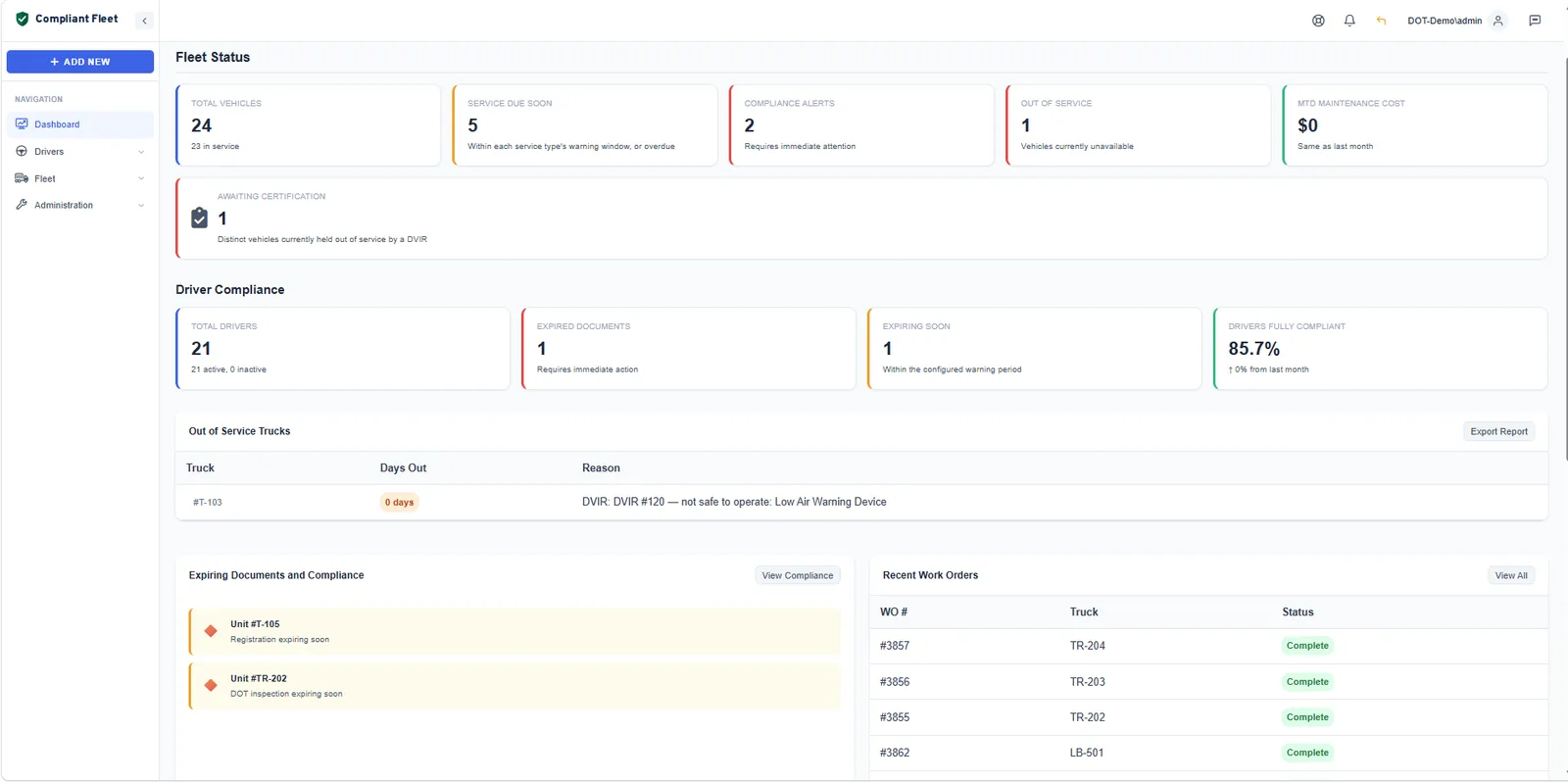
Compliant Fleet keeps your driver qualification files, CDL and medical card dates, drug and alcohol records, annual inspections, DVIRs and maintenance in one place, and warns you before key dates pass.
No hardware to install. Import your drivers and trucks from a spreadsheet.
Built around the rules auditors check
- Part 391 Driver qualification
- Part 382 Drug & alcohol
- §390.15 Accident register
- Part 396 Inspection & maintenance
One app, four jobs
The DOT records you have to keep, for drivers and trucks
Compliant Fleet covers the four areas a small fleet has to keep current. Use one, or run all four from the same dashboard.
Driver Qualifications
Every driver’s DQ file on one matrix, scored, with every gap flagged.
- 13 FMCSA requirement types
- Compliance score per driver
- DQ file report in PDF or CSV
Driver DOT Requirements
The dates and records that keep each driver legal to drive.
- CDL and medical card history
- Annual MVR reviews
- Drug & alcohol and Clearinghouse
Truck DOT Requirements
Inspection, registration and DVIR status for every unit.
- Annual inspection, plates, insurance, IRP
- Digital DVIRs with photos
- Out-of-service holds on defects
Vehicle Maintenance
Preventive maintenance that runs on your intervals, not your memory.
- PM by date, miles or engine hours
- Work orders with labor and parts
- Service history per truck
Why one app
Stop paying for two apps that never talk to each other
Most small fleets end up with a maintenance app for the trucks and a separate driver-file tracker for the people. Each one sees half the picture. Compliant Fleet covers both.
| What you need to track | Typical fleet maintenance app | Typical DQ file tracker | Compliant Fleet |
|---|---|---|---|
| Driver qualification files (Part 391) | No | Yes | Yes |
| CDL and medical card expirations | No | Yes | Yes |
| Drug & alcohol and Clearinghouse records | No | Documents only | Yes |
| Annual inspection, registration and insurance dates | Yes | Rarely | Yes |
| DVIRs with photos and signatures | Yes | No | Yes |
| PM schedules and work orders | Yes | No | Yes |
| Drivers and trucks on one dashboard | No | No | Yes |
Based on our September 2026 review of published features from self-serve fleet maintenance apps and DQ file trackers. Individual products vary.
How Compliant Fleet works
See what needs attention before an auditor or inspector does
Expiration alerts
User configurable warnings for each requirement
Set how much notice you want for each driver and truck requirement, anywhere from 0 to 90 days. Compliant Fleet checks every date each night and emails a digest of what is expiring or expired. Drivers are also reminded of these upcoming renewals.
- Separate warning periods for CDL, medical card, annual inspection, registration and more
- Nightly office digests for drivers and trucks, by email and in the app
- Driver notices for their own documents
Driver qualification files
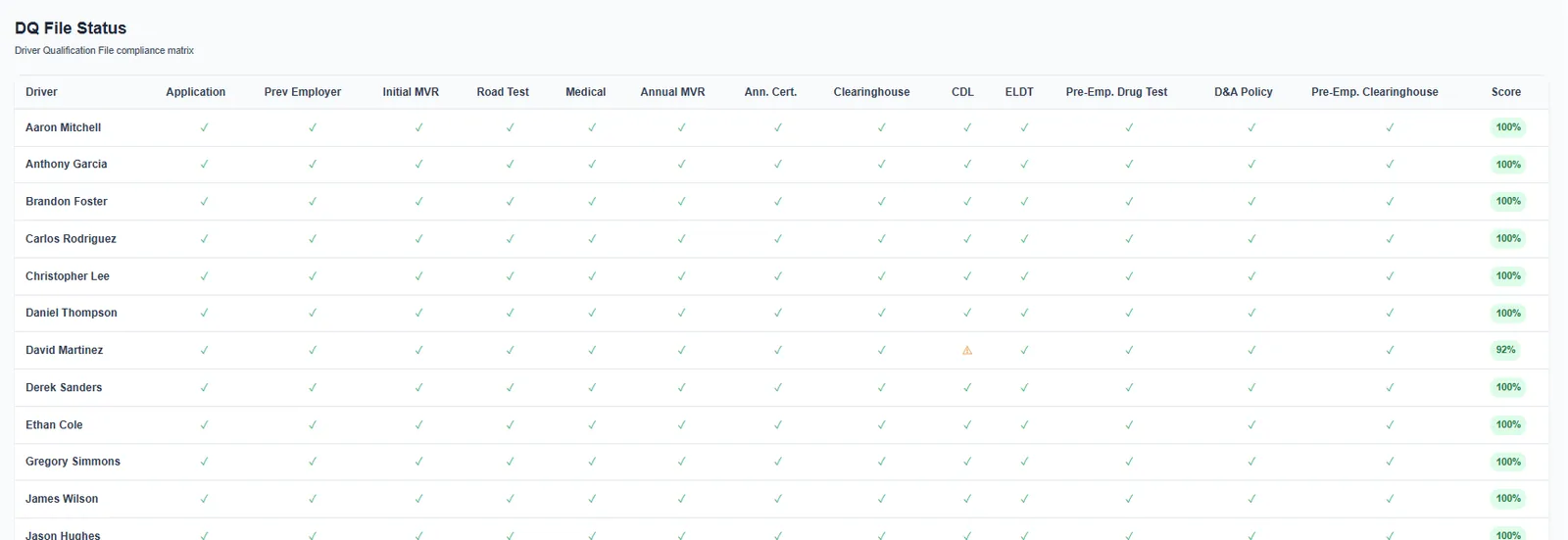
Every DQ requirement on one screen
The DQ file matrix lines up every driver against 13 FMCSA requirement types, from the employment application and pre-employment MVR to the annual review and Clearinghouse queries. Gaps show up as red, expiring items as amber, and each driver gets a compliance score.
Digital DVIRs
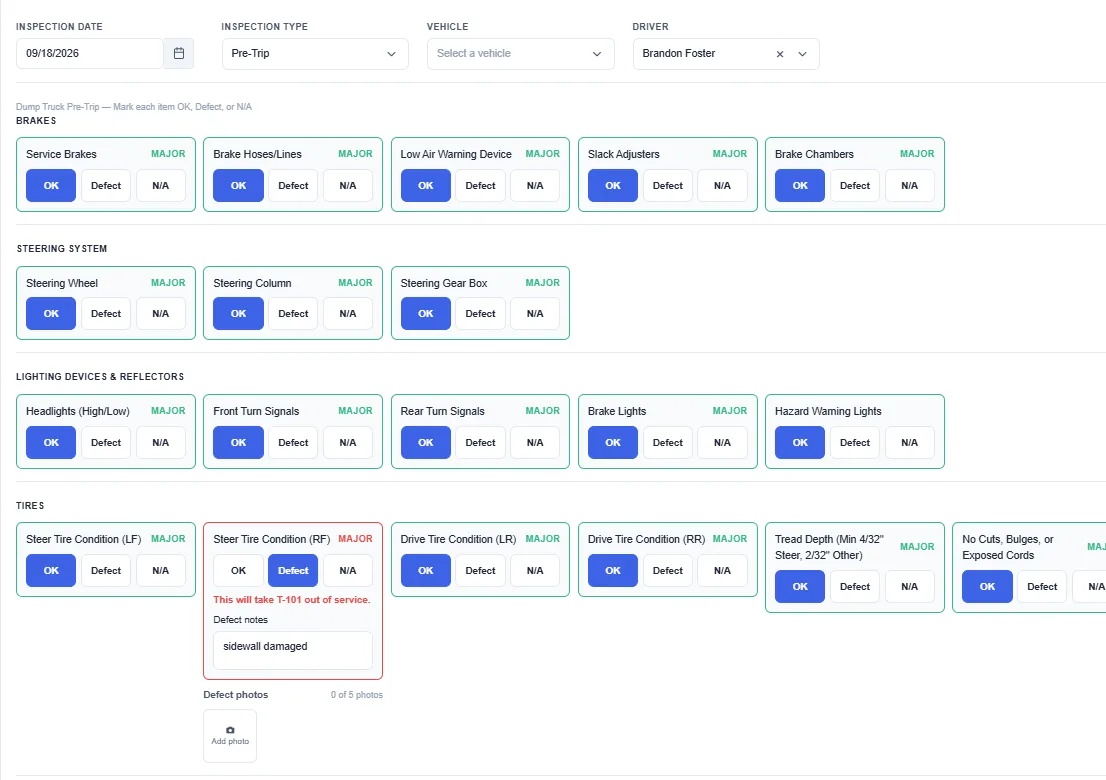
A major defect puts the truck out of service
Drivers work through a DVIR checklist that starts from the standard FMCSA inspection items. When a driver marks a major defect, the truck goes on the out-of-service list and stays there until a mechanic certifies the repair.
Audit-ready reports
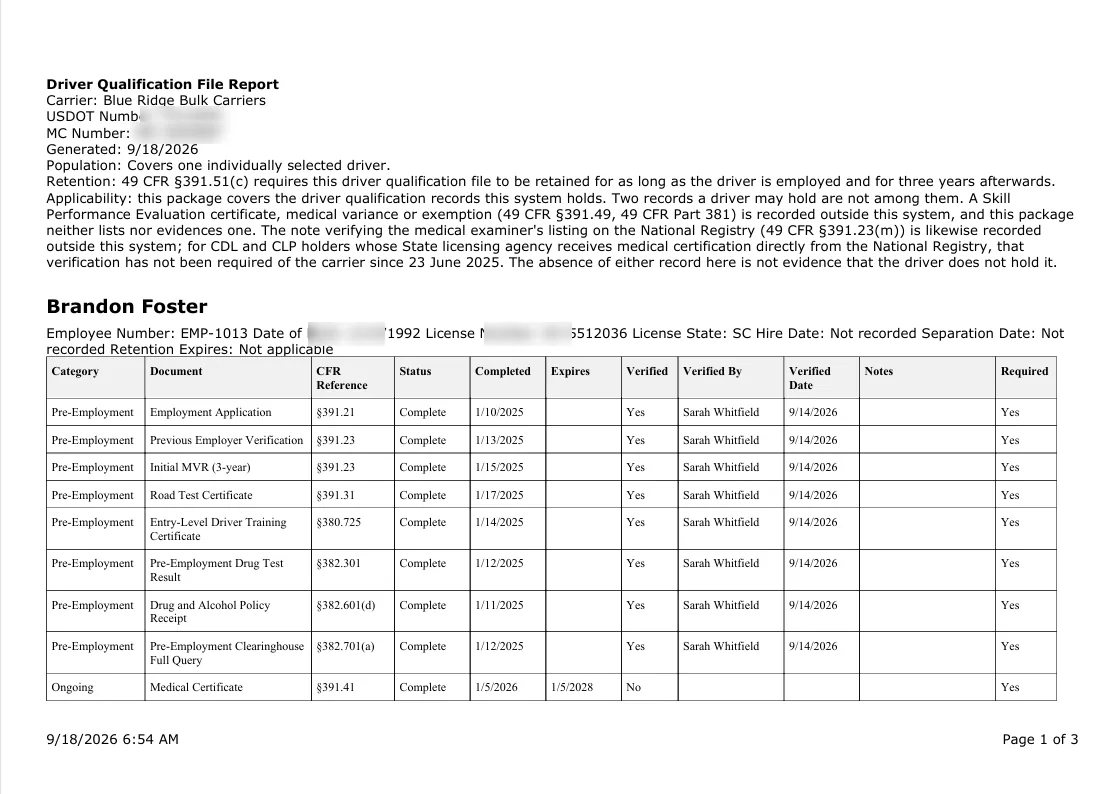
Generate a driver’s DQ file report in one click
When an auditor asks for a driver’s file, generate it. The DQ file report lists your carrier name and USDOT number, the driver’s details, and every requirement with its CFR reference, completion and expiration dates, and who verified it.
- Full DQ file package, summary or status report
- Printable PDF audit copy or CSV
- Optional sections: current CDL, medical certificate, MVR review history, document manifest, drug and alcohol tests and Clearinghouse queries
Getting started
Up and running without a sales call
-
Add your fleet
Import drivers and trucks from a spreadsheet, or add them one at a time. Upload the documents you already have.
-
Set your warning windows
Pick how many days’ notice you want for each requirement, and choose who in the office gets the nightly digests.
-
Work the list
Dashboards and digests show what’s expiring, expired or missing. Record the renewal and the item turns green.
The cost of a missed date
FMCSA penalties add up fast
Civil penalties are set per violation, and recordkeeping penalties accrue daily. A tracked date costs far less than a missed one.
Maximum penalty per day for a recordkeeping violation, such as an incomplete driver qualification file.
Maximum total for a single recordkeeping violation that continues over time.
Maximum per non-recordkeeping violation of the safety regulations by a motor carrier.
Source: 49 CFR Part 386, Appendix B, paragraphs (a)(1) and (a)(3), as published on eCFR in September 2026. Amounts are adjusted for inflation each year.
From fleets using Compliant Fleet
What fleet owners say
Placeholder testimonial. Ask a beta fleet for a specific result, such as how long their last audit prep took compared with before.
Placeholder testimonial. A quote about catching an expiring medical card or registration before it grounded a truck.
Placeholder testimonial. A quote about replacing spreadsheets or two separate apps with one.
What is DOT compliance software?
DOT compliance software keeps the records and dates a motor carrier needs under the Federal Motor Carrier Safety Regulations in one system. For drivers, that means driver qualification files, CDL and medical card expirations, MVR reviews and drug and alcohol records. For trucks, it means annual inspections, registrations, DVIRs and maintenance. Good software warns you before something expires.
What does Compliant Fleet track?
Compliant Fleet tracks four areas in one app:
- Driver qualification files under 49 CFR Part 391
- Driver DOT requirements: CDL, medical certificate, annual MVR review, drug and alcohol testing, Clearinghouse queries and the accident register
- Truck DOT requirements: annual inspection, plate registration, insurance, IRP and DVIRs
- Vehicle maintenance: PM schedules, work orders and service history
Does Compliant Fleet order MVRs or run drug tests?
No. Compliant Fleet keeps the records; it is not a testing lab, consortium, TPA or MVR provider. You keep working with the providers you use today and record the results, reviews and queries in Compliant Fleet, where they are tracked, dated and included in your DQ file reports.
Can I import my existing spreadsheets?
Yes. You can import drivers and vehicles from a spreadsheet instead of typing them in one at a time. Most fleets start by importing their roster and truck list, then add expiration dates and documents.
How do expiration alerts work?
You choose a warning period for each requirement, from 0 to 90 days. Every night, Compliant Fleet sends office staff a digest of driver and truck items that are expiring or expired, by email and in the app. Drivers also get their own notices about their documents.
Is Compliant Fleet a replacement for a safety consultant?
Compliant Fleet is recordkeeping and reminder software. It organizes your records, shows gaps and tells you what is coming due, but it does not give legal advice or make filings for you. Many fleets use it alongside their safety consultant, who can review the same reports.
Know what’s expiring before it grounds a truck.
Load your drivers and trucks, set your warning windows, and let Compliant Fleet watch the dates.